
Getting Started with Flutter
Introduction
Flutter is one of the most powerful frameworks for building modern mobile applications using a single codebase. Developed by Google, Flutter enables developers to create high-performance, visually rich Android and iOS applications efficiently. This module introduces Flutter from scratch and guides learners through setting up their first Flutter application.
Have you missed the previous lesson? Mobile Application Development: Introduction, Native vs Cross-Platform Apps with Flutter
1. Getting Started with Flutter
Topic Content Overview
This section covers:
-
What Flutter is
-
Why Flutter is used
-
Key features of Flutter
-
Platforms supported by Flutter
Flutter is widely adopted in academia and industry due to its fast development cycle, hot reload feature, and native-like performance.
Definition of Flutter
Flutter is an open-source UI software development kit (SDK) developed by Google that allows developers to build cross-platform applications for Android, iOS, web, and desktop using a single programming language called Dart.
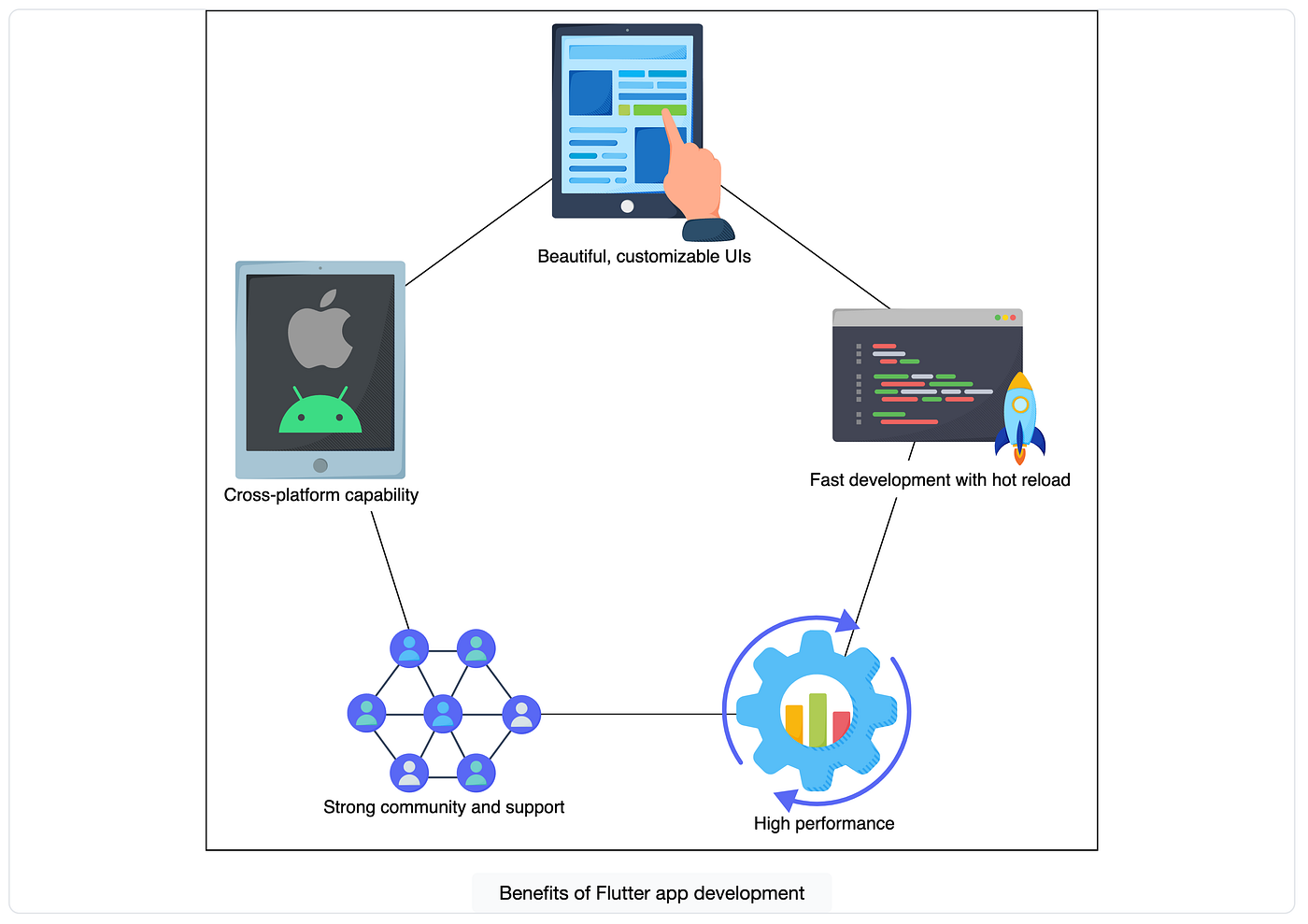
Key Features of Flutter
-
Single codebase for multiple platforms
-
Hot Reload for instant UI updates
-
Rich set of customizable widgets
-
High performance using Skia rendering engine
-
Strong community and Google support
2. History of Flutter & Flutter Versions
Topic Content Overview
Understanding Flutter’s evolution helps learners appreciate its stability and industry adoption.
History of Flutter
-
2015: Flutter introduced as “Sky”
-
2017: First public release (Alpha)
-
2018: Flutter Beta
-
2019: Flutter 1.0 (Stable release)
-
Present: Continuous stable updates with performance and platform improvements
Flutter has evolved into a production-ready framework used by companies such as Google, Alibaba, BMW, and eBay.
Flutter Versions
Flutter releases follow a stable channel system:
-
Stable – Recommended for production
-
Beta – Early access to new features
-
Dev – Active development
-
Master – Experimental
3. Introduction to Flutter & Dart
Topic Content Overview
This section introduces the Flutter framework and the Dart programming language, explaining their roles in mobile app development.
What is Dart?
Dart is an object-oriented, class-based programming language developed by Google. It is optimized for building fast UI applications and supports:
-
Just-In-Time (JIT) compilation (for development)
-
Ahead-Of-Time (AOT) compilation (for production)
Role of Dart in Flutter
-
Handles application logic
-
Defines UI structure using widgets
-
Manages state and user interaction
Simple Dart Example
void main() {
  print("Welcome to Flutter with Dart");
}
Real-Time Use:
This is the entry point of every Flutter application.
4. Overview of Flutter Project Folder Structure
Topic Content Overview
A Flutter project follows a well-defined folder structure that helps developers organize code efficiently.
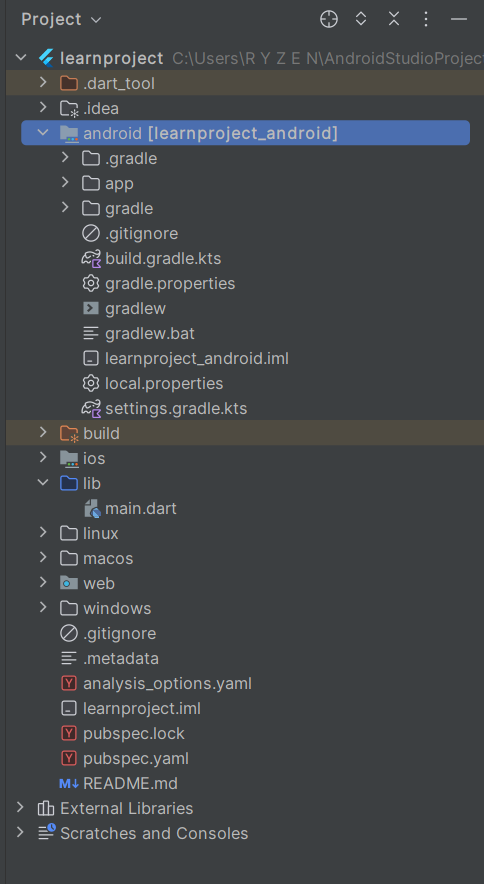
Flutter Project Structure
| Folder/File | Purpose |
|---|---|
| lib/ | Main application code |
| main.dart | Entry point of the app |
| android/ | Android-specific code |
| ios/ | iOS-specific code |
| pubspec.yaml | Project configuration |
| test/ | Unit and widget tests |
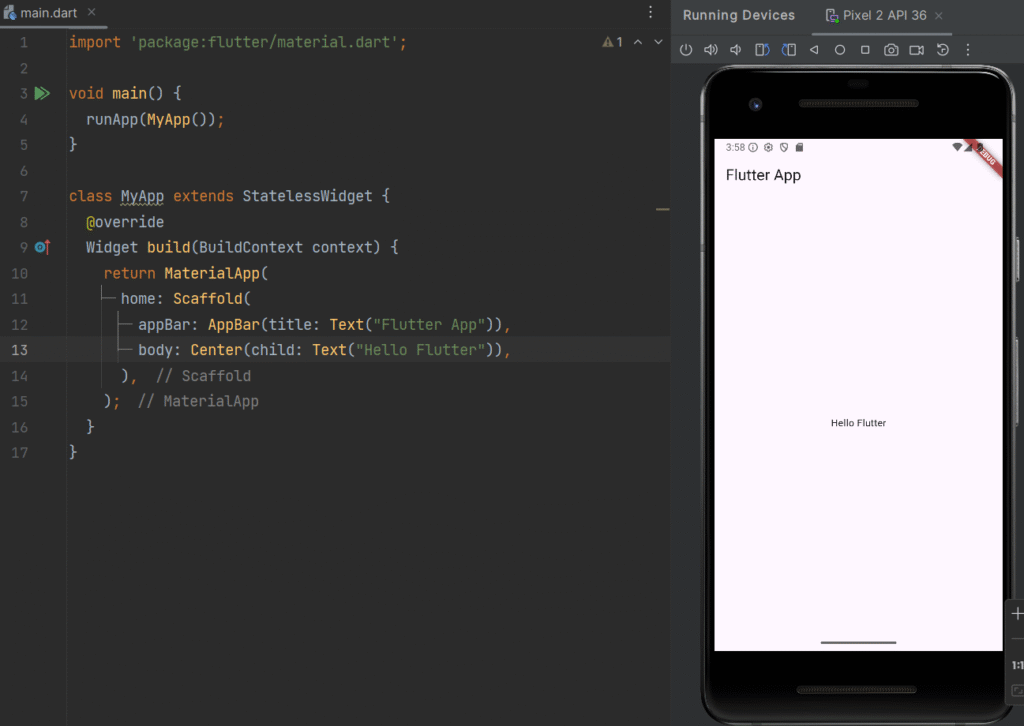
main.dart (Entry File Example)
import 'package:flutter/material.dart';

void main() {
  runApp(MyApp());
}

class MyApp extends StatelessWidget {
  @override
  Widget build(BuildContext context) {
    return MaterialApp(
      home: Scaffold(
        appBar: AppBar(title: Text("Flutter App")),
        body: Center(child: Text("Hello Flutter")),
      ),
    );
  }
}
5. Understanding pubspec.yaml & Dependencies
Topic Content Overview
The pubspecs.yaml file manages:
-
App metadata
-
Flutter SDK version
-
External packages (dependencies)
-
Assets (images, fonts)
pubspec.yaml Example
name: flutter_course_app
description: A beginner Flutter project
version: 1.0.0+1

environment:
  sdk: ">=3.0.0 <4.0.0"

dependencies:
  flutter:
    sdk: flutter
  http: ^1.1.0
Why Dependencies Matter
Dependencies allow developers to:
-
Fetch APIs
-
Manage state
-
Access device features
-
Speed up development
Real-Time Example:
The http package is used for REST API integration in real-world apps.
Real-Time Application Example
This default app demonstrates:
-
Stateful widgets
-
Button click events
-
UI rebuilding using setState()
These concepts are used in real production apps such as dashboards, forms, and counters.
Conclusion
This module provides a complete foundation for Flutter development by covering its history, structure, configuration files, and first application execution. Mastering these basics prepares learners to move confidently toward UI design, navigation, state management, and backend integration in Flutter.
Ready to know about data structure concepts? Check your DS course concepts by visiting the link.
Stay updated with the latest lessons in mobile application development, Flutter tutorials, and real-world app development examples. Subscribe now to receive expert insights, step-by-step guides, and course updates directly in your inbox. Never miss an opportunity to enhance your mobile development skills and stay ahead in the tech industry.