Building a Complete Cloudinary Upload App in Flutter (MVC Architecture + Real-Time Progress + Elegant UI)
Modern mobile apps frequently need file uploads.
Whether you’re building:
- A social media platform
- Student assignment submission system
- E-commerce app
- Portfolio application
- Profile management system
Uploading images and files is a core feature.
And when it comes to cloud-based media management, Cloudinary is one of the most powerful solutions available.
In this step-by-step tutorial, we’ll build a complete Flutter Cloudinary upload app using:
✔ MVC Architecture
✔ Real-Time Upload Progress
✔ Elegant User Interface
✔ Image Preview
✔ Error Handling
✔ Clean Code Structure
By the end of this guide, you’ll have a production-ready file upload system.
🚀 Why Cloudinary for Flutter?
Cloudinary is a cloud-based image and video management service that offers:
-
⚡ Fast file uploads
-
🛡 Secure storage
-
🔄 Automatic file optimization
-
🖼 Smart transformations
-
🌍 Global CDN delivery
-
📄 Support for images, videos, documents, PDFs, and more
It is perfect for Flutter apps because Cloudinary handles heavy lifting like compression, storage, and CDN caching — allowing your app to stay fast and lightweight.
🧱 Why Use MVC Architecture in Flutter?
MVC (Model-View-Controller) divides your app into three clean layers:
✔ Model
Handles data only (structure, types, properties).
✔ View
UI screens, widgets, layout — no business logic.
✔ Controller
Business logic, state, interactions, upload process.
This makes your app:
-
Clean
-
Testable
-
Maintainable
-
Scalable
-
Developer-friendly
✨ What We Are Building Today
A complete Flutter app that allows users to:
✔ Upload image from Gallery
✔ Capture photo from Camera
✔ Upload any file (PDF, DOCX, ZIP, etc.)
✔ View real-time upload progress
✔ Display uploads on screen
✔ Beautiful & simple UI
✔ Cloudinary-backed media storage
📌 App Preview (UI Flow)

🧩 Project Folder Structure (MVC)
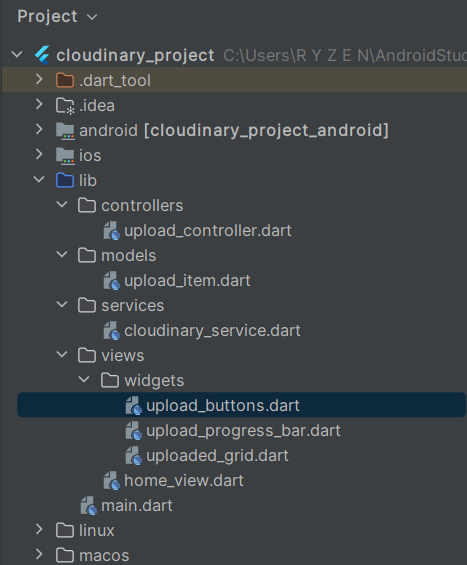
🏗 Step-by-Step Implementation (Full Code)
Below is the complete code used in this app.
Each part is clearly explained.
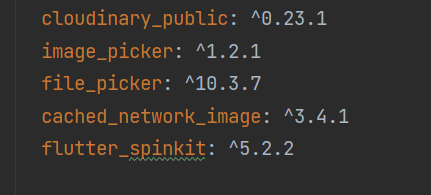
Recommended package choices (used in example)
-
cloudinary_public— easy client uploads to Cloudinary (unsigned preset support, progress callbacks, chunking). -
image_picker— pick images from gallery/camera. -
file_picker— pick other file types. -
provider(optional) orsetStatefor state management. -
cached_network_image(optional) for efficient image display.
Why cloudinary_public? It gives CloudinaryPublic('CLOUD_NAME', 'UPLOAD_PRESET') and an uploadFile() method with a progress callback. It supports multi-upload, chunked upload, and transformations client-side.
1️⃣ Model — upload_item.dart
The Model defines the structure of a single uploaded item.
// lib/models/upload_item.dart

class UploadItem {
  final String url;
  final String publicId;
  final DateTime uploadedAt;

  UploadItem({
    required this.url,
    required this.publicId,
    required this.uploadedAt,
  });
}
2️⃣ Service — cloudinary_service.dart
This layer handles Cloudinary API communication.
// lib/services/cloudinary_service.dart

import 'package:cloudinary_public/cloudinary_public.dart';

class CloudinaryService {
  final CloudinaryPublic cloudinary = CloudinaryPublic(
    'YOUR_CLOUD_NAME',
    'YOUR_UPLOAD_PRESET',
    cache: false,
  );

  Future<CloudinaryResponse> uploadFile(
      String filePath,
      CloudinaryResourceType type,
      Function(double progress)? onProgress,
      ) async {
    return await cloudinary.uploadFile(
      CloudinaryFile.fromFile(filePath, resourceType: type),
      onProgress: (count, total) {
        if (onProgress != null && total != 0) {
          onProgress(count / total);
        }
      },
    );
  }
}
3️⃣ Controller — upload_controller.dart
The Controller connects user actions with Cloudinary.
It manages:
✔ Image Picker
✔ File Picker
✔ Upload logic
✔ Progress updates
✔ Uploaded items list
// lib/controllers/upload_controller.dart

import 'dart:io';
import 'package:image_picker/image_picker.dart';
import 'package:file_picker/file_picker.dart';
import '../models/upload_item.dart';
import '../services/cloudinary_service.dart';
import 'package:cloudinary_public/cloudinary_public.dart';
import 'package:flutter/material.dart';

class UploadController with ChangeNotifier {
  final CloudinaryService cloudinaryService = CloudinaryService();

  final ImagePicker picker = ImagePicker();
  bool isUploading = false;
  double progress = 0.0;

  List<UploadItem> uploads = [];

  // ---------------------- PICK IMAGE ----------------------
  Future<void> pickImage(ImageSource source) async {
    final XFile? picked = await picker.pickImage(
      source: source,
      imageQuality: 85,
      maxWidth: 2000,
    );

    if (picked == null) return;

    await upload(picked.path, CloudinaryResourceType.Image);
  }

  // ---------------------- PICK FILE ----------------------
  Future<void> pickFile() async {
    final result = await FilePicker.platform.pickFiles();

    if (result == null || result.files.isEmpty) return;

    await upload(result.files.first.path!, CloudinaryResourceType.Auto);
  }

  // ---------------------- UPLOAD FILE ----------------------
  Future<void> upload(String path, CloudinaryResourceType type) async {
    try {
      isUploading = true;
      progress = 0;
      notifyListeners();

      final response = await cloudinaryService.uploadFile(
        path,
        type,
            (p) {
          progress = p;
          notifyListeners();
        },
      );

      uploads.insert(
        0,
        UploadItem(
          url: response.secureUrl,
          publicId: response.publicId,
          uploadedAt: DateTime.now(),
        ),
      );
    } catch (e) {
      debugPrint("Upload error: $e");
    } finally {
      isUploading = false;
      notifyListeners();
    }
  }
}
4️⃣ Views & Widgets (UI Layer)
This is the View part of MVC.
🏠 Home Screen — home_view.dart
// lib/views/home_view.dart

import 'package:flutter/material.dart';
import 'package:provider/provider.dart';
import '../controllers/upload_controller.dart';
import 'widgets/upload_buttons.dart';
import 'widgets/upload_progress_bar.dart';
import 'widgets/uploaded_grid.dart';

class HomeView extends StatelessWidget {
  const HomeView({super.key});

  @override
  Widget build(BuildContext context) {
    final controller = Provider.of<UploadController>(context);

    return Scaffold(
      appBar: AppBar(
        title: const Text("Cloudinary MVC Upload"),
        backgroundColor: Colors.indigo,
      ),
      body: Column(
        children: [
          const SizedBox(height: 12),

          /// Upload Buttons
          UploadButtons(),

          /// Progress Bar
          if (controller.isUploading)
            UploadProgressBar(progress: controller.progress),

          const Divider(),

          /// Gallery
          const Expanded(child: UploadedGrid()),
        ],
      ),
    );
  }
}
🎚 Upload Buttons Widget
// lib/views/widgets/upload_buttons.dart

import 'package:flutter/material.dart';
import 'package:image_picker/image_picker.dart';
import 'package:provider/provider.dart';
import '../../controllers/upload_controller.dart';

class UploadButtons extends StatelessWidget {
  @override
  Widget build(BuildContext context) {
    final controller = Provider.of<UploadController>(context, listen: false);

    return Row(
      mainAxisAlignment: MainAxisAlignment.spaceAround,
      children: [
        ElevatedButton.icon(
          onPressed: () => controller.pickImage(ImageSource.gallery),
          icon: const Icon(Icons.photo_library),
          label: const Text("Gallery"),
        ),
        ElevatedButton.icon(
          onPressed: () => controller.pickImage(ImageSource.camera),
          icon: const Icon(Icons.camera_alt),
          label: const Text("Camera"),
        ),
        ElevatedButton.icon(
          onPressed: controller.pickFile,
          icon: const Icon(Icons.attach_file),
          label: const Text("File"),
        ),
      ],
    );
  }
}
📊 Upload Progress Indicator Widget
// lib/views/widgets/upload_progress_bar.dart

import 'package:flutter/material.dart';

class UploadProgressBar extends StatelessWidget {
  final double progress;

  const UploadProgressBar({required this.progress, super.key});

  @override
  Widget build(BuildContext context) {
    return Column(
      children: [
        LinearProgressIndicator(value: progress),
        const SizedBox(height: 6),
        Text("${(progress * 100).toStringAsFixed(0)}%"),
      ],
    );
  }
}
🖼 Uploaded Grid Widget
// lib/views/widgets/uploaded_grid.dart

import 'package:flutter/material.dart';
import 'package:cached_network_image/cached_network_image.dart';
import 'package:provider/provider.dart';
import '../../controllers/upload_controller.dart';

class UploadedGrid extends StatelessWidget {
  const UploadedGrid({super.key});

  @override
  Widget build(BuildContext context) {
    final controller = Provider.of<UploadController>(context);

    if (controller.uploads.isEmpty) {
      return const Center(child: Text("No uploads yet."));
    }

    return GridView.builder(
      padding: const EdgeInsets.all(8),
      itemCount: controller.uploads.length,
      gridDelegate: const SliverGridDelegateWithFixedCrossAxisCount(
        crossAxisCount: 2,
        crossAxisSpacing: 8,
        mainAxisSpacing: 8,
      ),
      itemBuilder: (context, i) {
        final item = controller.uploads[i];

        return ClipRRect(
          borderRadius: BorderRadius.circular(12),
          child: CachedNetworkImage(
            imageUrl: item.url,
            placeholder: (c, s) => Container(
              color: Colors.grey[200],
              child: const Center(child: CircularProgressIndicator()),
            ),
            errorWidget: (c, s, e) => const Icon(Icons.error),
            fit: BoxFit.cover,
          ),
        );
      },
    );
  }
}
5️⃣ Main File — main.dart
// lib/main.dart

import 'package:flutter/material.dart';
import 'package:provider/provider.dart';
import 'controllers/upload_controller.dart';
import 'views/home_view.dart';

void main() {
  runApp(
    MultiProvider(
      providers: [
        ChangeNotifierProvider(create: (_) => UploadController()),
      ],
      child: const MyApp(),
    ),
  );
}

class MyApp extends StatelessWidget {
  const MyApp({super.key});

  @override
  Widget build(BuildContext context) {
    return MaterialApp(
      title: 'Cloudinary MVC Flutter',
      debugShowCheckedModeBanner: false,
      home: const HomeView(),
    );
  }
}
🔥 Important Tips for Deployment
✔ Use your real Cloudinary cloud_name
✔ Use an unsigned upload_preset
✔ Enable CORS (if using APIs)
✔ Use caching for faster previews
✔ Serve images via Cloudinary CDN
Real-World Use Cases
This upload architecture can power:
- Profile photo upload systems
- Assignment submission portals
- E-commerce product uploads
- Social media post sharing
- Portfolio builders
Final Thoughts
Building a Cloudinary upload app in Flutter is one of the most practical projects for mastering:
- File handling
- API integration
- Real-time progress
- Elegant UI design
- MVC architecture
This project teaches production-grade development patterns.
Conclusion
A complete Cloudinary upload app in Flutter using MVC architecture gives you everything needed for modern file-based mobile applications.
It combines:
✔ Scalability
✔ Clean architecture
✔ Beautiful UI
✔ Real-time progress
✔ Cloud storage efficiency
Master this project, and you’ll be ready to build professional Flutter apps with confidence.