Introduction
User authentication is a core requirement of almost every mobile application. Whether you are building an e-commerce app, LMS, social media platform, or university portal system, you must implement a secure and user-friendly Login and SignUp interface.
In this complete guide, you will learn:
-
How to create Login and SignUp UI in Flutter
-
How to use
TextFormFieldwith validation -
How to switch between Login and Register screens
-
How to toggle password visibility
-
How to manage form state using
StatefulWidget -
Clean and professional UI design approach
This guide is practical and production-oriented.
Project Structure
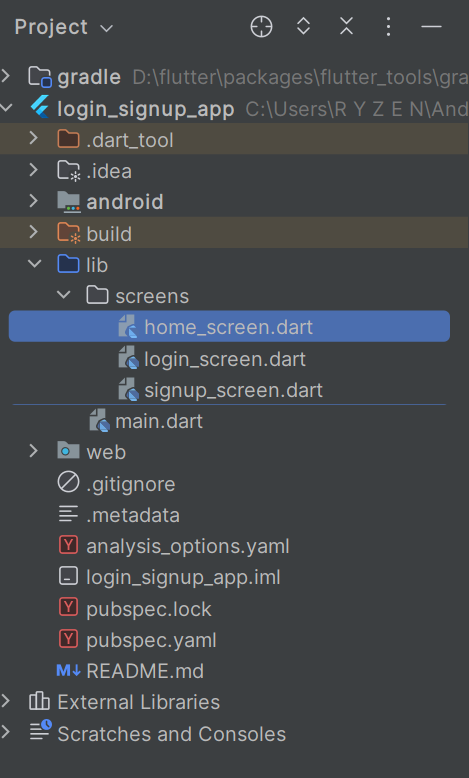
Step 1: Setup Main File
main.dart
import 'package:flutter/material.dart';
import 'screens/login_screen.dart';

void main() {
  runApp(MyApp());
}

class MyApp extends StatelessWidget {
  @override
  Widget build(BuildContext context) {
    return MaterialApp(
      debugShowCheckedModeBanner: false,
      title: 'Flutter Auth UI',
      theme: ThemeData(
        primarySwatch: Colors.blue,
      ),
      home: LoginScreen(),
    );
  }
}
Step 2: Create Login Screen
login_screen.dart
import 'package:flutter/material.dart';
import 'home_screen.dart';
import 'signup_screen.dart';


class LoginScreen extends StatefulWidget {
  @override
  _LoginScreenState createState() => _LoginScreenState();
}

class _LoginScreenState extends State<LoginScreen> {

  final _formKey = GlobalKey<FormState>();
  final emailController = TextEditingController();
  final passwordController = TextEditingController();

  bool isPasswordHidden = true;

  @override
  Widget build(BuildContext context) {
    return Scaffold(
      body: Padding(
        padding: EdgeInsets.all(20),
        child: Form(
          key: _formKey,
          child: Column(
            mainAxisAlignment: MainAxisAlignment.center,
            children: [

              Text(
                "Login",
                style: TextStyle(fontSize: 28, fontWeight: FontWeight.bold),
              ),

              SizedBox(height: 30),

              // Email Field
              TextFormField(
                controller: emailController,
                decoration: InputDecoration(
                  labelText: "Email",
                  border: OutlineInputBorder(),
                ),
                validator: (value) {
                  if (value == null || value.isEmpty) {
                    return "Please enter email";
                  }
                  if (!value.contains('@')) {
                    return "Enter valid email";
                  }
                  return null;
                },
              ),

              SizedBox(height: 20),

              // Password Field
              TextFormField(
                controller: passwordController,
                obscureText: isPasswordHidden,
                decoration: InputDecoration(
                  labelText: "Password",
                  border: OutlineInputBorder(),
                  suffixIcon: IconButton(
                    icon: Icon(isPasswordHidden
                        ? Icons.visibility
                        : Icons.visibility_off),
                    onPressed: () {
                      setState(() {
                        isPasswordHidden = !isPasswordHidden;
                      });
                    },
                  ),
                ),
                validator: (value) {
                  if (value == null || value.length < 6) {
                    return "Password must be at least 6 characters";
                  }
                  return null;
                },
              ),

              SizedBox(height: 25),

              ElevatedButton(
                onPressed: () {
                  if (_formKey.currentState!.validate()) {
                    Navigator.push(
                      context,
                      MaterialPageRoute(builder: (_) => HomeScreen()),
                    );
                  }
                },
                child: Text("Login"),
              ),

              SizedBox(height: 15),

              TextButton(
                onPressed: () {
                  Navigator.push(
                    context,
                    MaterialPageRoute(builder: (_) => SignUpScreen()),
                  );
                },
                child: Text("Don't have an account? Sign Up"),
              )
            ],
          ),
        ),
      ),
    );
  }
}
Step 3: Create SignUp Screen
signup_screen.dart
import 'package:flutter/material.dart';

class SignUpScreen extends StatefulWidget {
  @override
  _SignUpScreenState createState() => _SignUpScreenState();
}

class _SignUpScreenState extends State<SignUpScreen> {

  final _formKey = GlobalKey<FormState>();

  final nameController = TextEditingController();
  final emailController = TextEditingController();
  final passwordController = TextEditingController();

  bool isPasswordHidden = true;

  @override
  Widget build(BuildContext context) {
    return Scaffold(
      body: Padding(
        padding: EdgeInsets.all(20),
        child: Form(
          key: _formKey,
          child: ListView(
            children: [

              SizedBox(height: 60),

              Text(
                "Sign Up",
                textAlign: TextAlign.center,
                style: TextStyle(fontSize: 28, fontWeight: FontWeight.bold),
              ),

              SizedBox(height: 30),

              TextFormField(
                controller: nameController,
                decoration: InputDecoration(
                  labelText: "Full Name",
                  border: OutlineInputBorder(),
                ),
                validator: (value) {
                  if (value == null || value.isEmpty) {
                    return "Enter your name";
                  }
                  return null;
                },
              ),

              SizedBox(height: 20),

              TextFormField(
                controller: emailController,
                decoration: InputDecoration(
                  labelText: "Email",
                  border: OutlineInputBorder(),
                ),
                validator: (value) {
                  if (value == null || value.isEmpty) {
                    return "Enter email";
                  }
                  return null;
                },
              ),

              SizedBox(height: 20),

              TextFormField(
                controller: passwordController,
                obscureText: isPasswordHidden,
                decoration: InputDecoration(
                  labelText: "Password",
                  border: OutlineInputBorder(),
                  suffixIcon: IconButton(
                    icon: Icon(isPasswordHidden
                        ? Icons.visibility
                        : Icons.visibility_off),
                    onPressed: () {
                      setState(() {
                        isPasswordHidden = !isPasswordHidden;
                      });
                    },
                  ),
                ),
                validator: (value) {
                  if (value == null || value.length < 6) {
                    return "Password must be 6+ characters";
                  }
                  return null;
                },
              ),

              SizedBox(height: 25),

              ElevatedButton(
                onPressed: () {
                  if (_formKey.currentState!.validate()) {
                    ScaffoldMessenger.of(context).showSnackBar(
                      SnackBar(content: Text("Account Created Successfully")),
                    );
                    Navigator.pop(context);
                  }
                },
                child: Text("Register"),
              ),
            ],
          ),
        ),
      ),
    );
  }
}
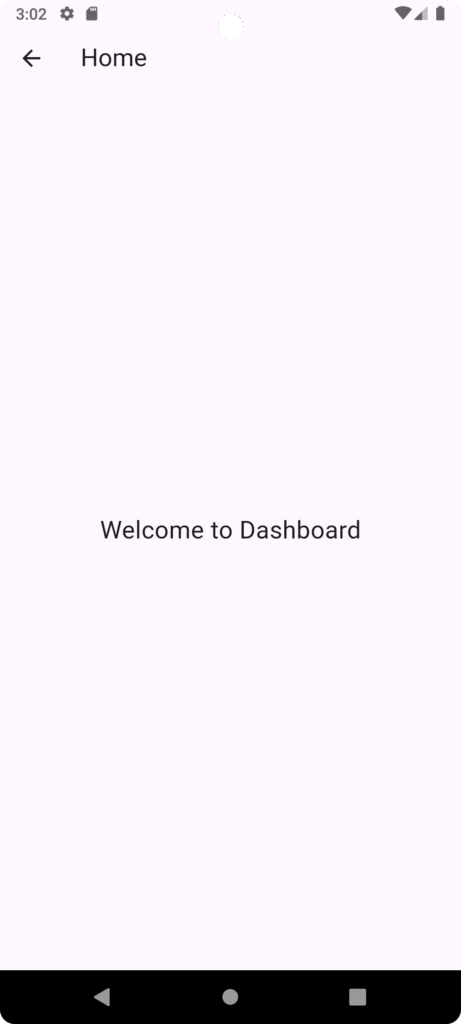
Step 4: Home Screen
import 'package:flutter/material.dart';

class HomeScreen extends StatelessWidget {
  @override
  Widget build(BuildContext context) {
    return Scaffold(
      appBar: AppBar(title: Text("Home")),
      body: Center(
        child: Text(
          "Welcome to Dashboard",
          style: TextStyle(fontSize: 22),
        ),
      ),
    );
  }
}
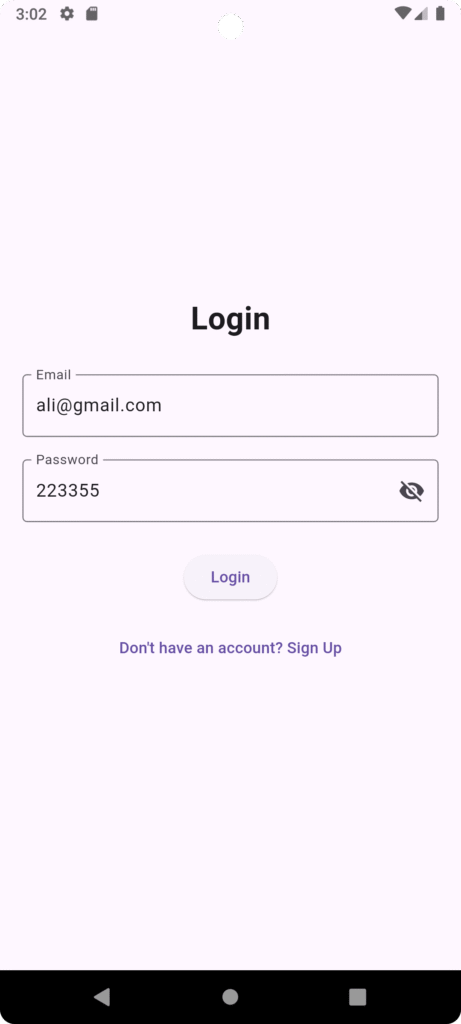
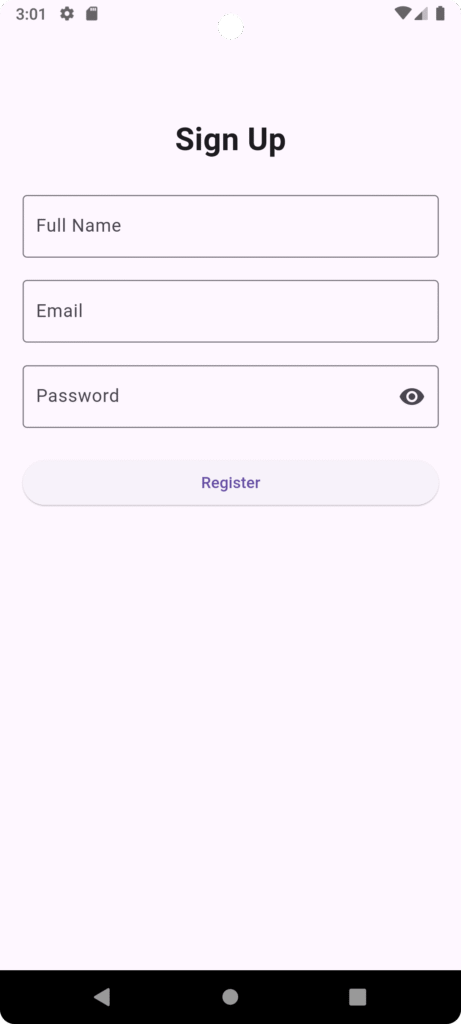
Different UI for login/signup page
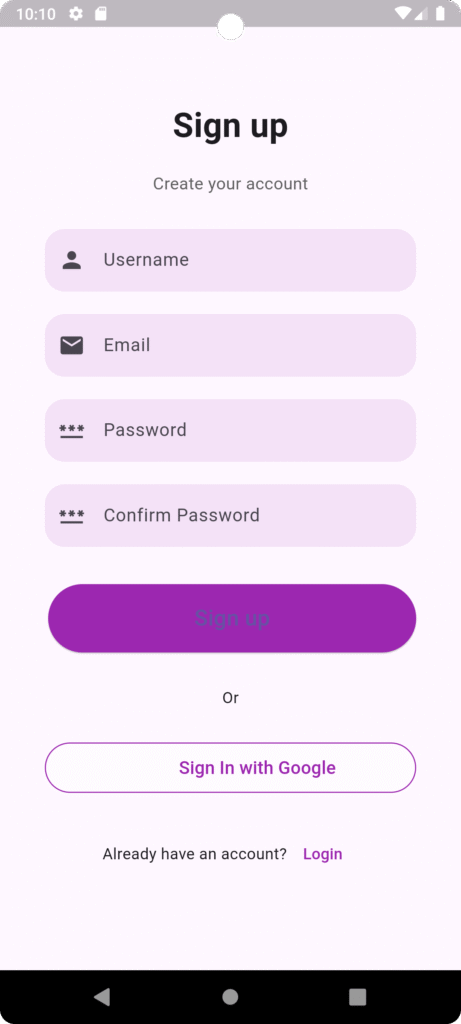
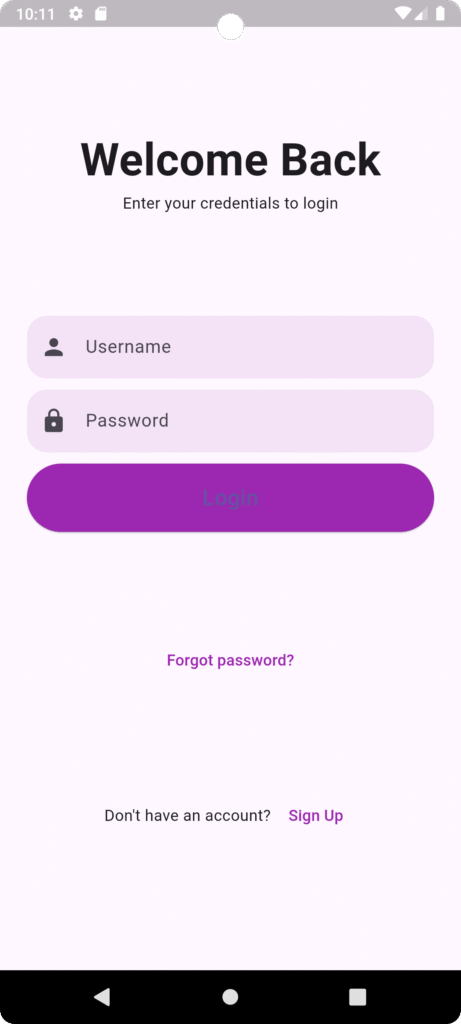
Project Structure:
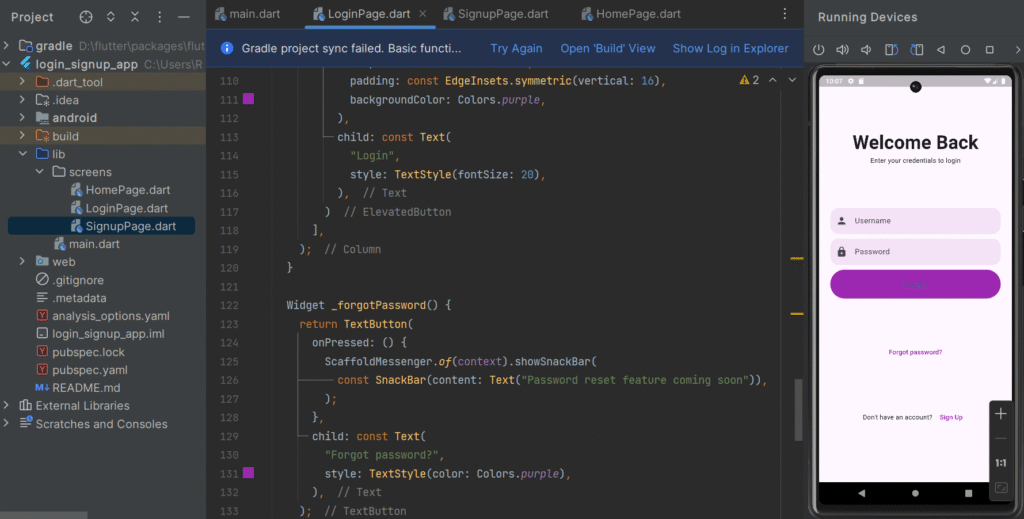
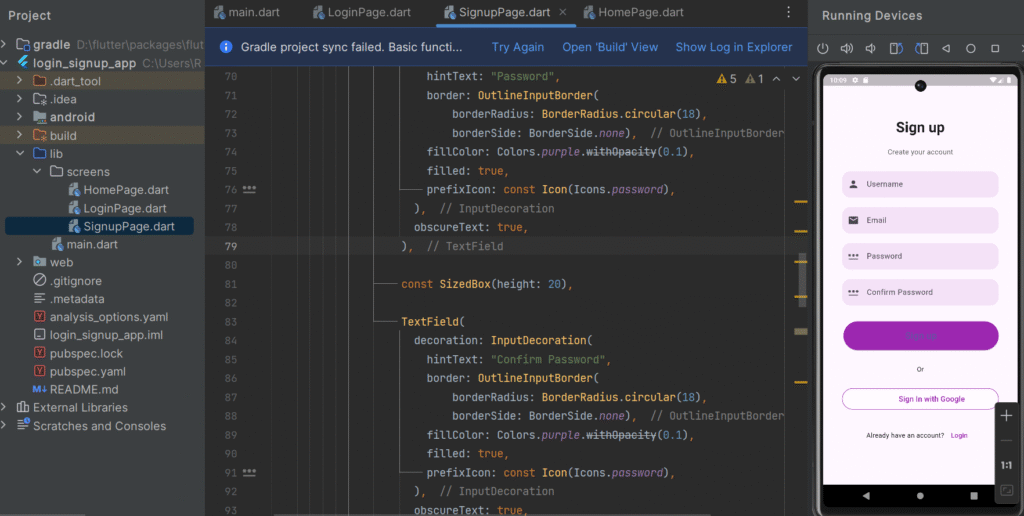
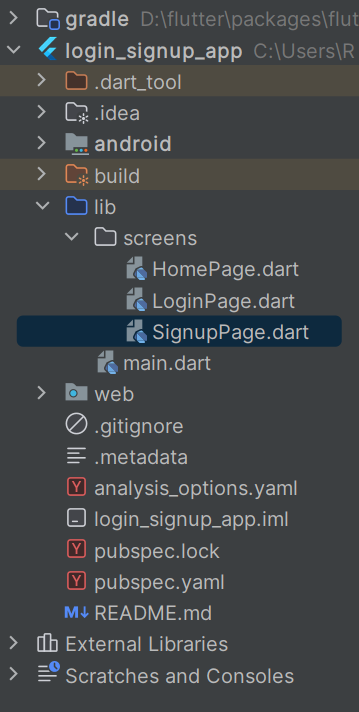
Login Screen Code:
import 'package:flutter/material.dart';
import 'HomePage.dart';
import 'SignupPage.dart';


class LoginPage extends StatefulWidget {
  const LoginPage({super.key});

  @override
  State<LoginPage> createState() => _LoginPageState();
}

class _LoginPageState extends State<LoginPage> {

  final _formKey = GlobalKey<FormState>();
  final TextEditingController usernameController = TextEditingController();
  final TextEditingController passwordController = TextEditingController();

  @override
  Widget build(BuildContext context) {
    return Scaffold(
      body: Container(
        margin: const EdgeInsets.all(24),
        child: Form(
          key: _formKey,
          child: Column(
            mainAxisAlignment: MainAxisAlignment.spaceEvenly,
            children: [
              _header(),
              _inputField(),
              _forgotPassword(),
              _signup(),
            ],
          ),
        ),
      ),
    );
  }

  Widget _header() {
    return const Column(
      children: [
        Text(
          "Welcome Back",
          style: TextStyle(fontSize: 40, fontWeight: FontWeight.bold),
        ),
        Text("Enter your credentials to login"),
      ],
    );
  }

  Widget _inputField() {
    return Column(
      crossAxisAlignment: CrossAxisAlignment.stretch,
      children: [
        TextFormField(
          controller: usernameController,
          decoration: InputDecoration(
            hintText: "Username",
            border: OutlineInputBorder(
              borderRadius: BorderRadius.circular(18),
              borderSide: BorderSide.none,
            ),
            fillColor: Colors.purple.withOpacity(0.1),
            filled: true,
            prefixIcon: const Icon(Icons.person),
          ),
          validator: (value) {
            if (value == null || value.isEmpty) {
              return "Please enter username";
            }
            return null;
          },
        ),
        const SizedBox(height: 10),
        TextFormField(
          controller: passwordController,
          obscureText: true,
          decoration: InputDecoration(
            hintText: "Password",
            border: OutlineInputBorder(
              borderRadius: BorderRadius.circular(18),
              borderSide: BorderSide.none,
            ),
            fillColor: Colors.purple.withOpacity(0.1),
            filled: true,
            prefixIcon: const Icon(Icons.lock),
          ),
          validator: (value) {
            if (value == null || value.length < 6) {
              return "Password must be at least 6 characters";
            }
            return null;
          },
        ),
        const SizedBox(height: 10),
        ElevatedButton(
          onPressed: () {
            if (_formKey.currentState!.validate()) {
              Navigator.push(
                context,
                MaterialPageRoute(
                  builder: (context) =>  HomePage(),
                ),
              );
            }
          },
          style: ElevatedButton.styleFrom(
            shape: const StadiumBorder(),
            padding: const EdgeInsets.symmetric(vertical: 16),
            backgroundColor: Colors.purple,
          ),
          child: const Text(
            "Login",
            style: TextStyle(fontSize: 20),
          ),
        )
      ],
    );
  }

  Widget _forgotPassword() {
    return TextButton(
      onPressed: () {
        ScaffoldMessenger.of(context).showSnackBar(
          const SnackBar(content: Text("Password reset feature coming soon")),
        );
      },
      child: const Text(
        "Forgot password?",
        style: TextStyle(color: Colors.purple),
      ),
    );
  }

  Widget _signup() {
    return Row(
      mainAxisAlignment: MainAxisAlignment.center,
      children: [
        const Text("Don't have an account? "),
        TextButton(
          onPressed: () {
            Navigator.push(
              context,
              MaterialPageRoute(
                builder: (context) => const SignUpPage(),
              ),
            );
          },
          child: const Text(
            "Sign Up",
            style: TextStyle(color: Colors.purple),
          ),
        )
      ],
    );
  }
}
Sign Up Screen Code:
import 'package:flutter/material.dart';

class SignUpPage extends StatelessWidget {
  const SignUpPage({super.key});

  @override
  Widget build(BuildContext context) {
    return MaterialApp(
      debugShowCheckedModeBanner: false,
      home: Scaffold(
        body: SingleChildScrollView(
          child: Container(
            padding: const EdgeInsets.symmetric(horizontal: 40),
            height: MediaQuery.of(context).size.height - 50,
            width: double.infinity,
            child: Column(
              mainAxisAlignment: MainAxisAlignment.spaceEvenly,
              crossAxisAlignment: CrossAxisAlignment.stretch,
              children: <Widget>[
                Column(
                  children: <Widget>[
                    const SizedBox(height: 60.0),

                    const Text(
                      "Sign up",
                      style: TextStyle(
                        fontSize: 30,
                        fontWeight: FontWeight.bold,
                      ),
                    ),
                    const SizedBox(
                      height: 20,
                    ),
                    Text(
                      "Create your account",
                      style: TextStyle(fontSize: 15, color: Colors.grey[700]),
                    )
                  ],
                ),
                Column(
                  children: <Widget>[
                    TextField(
                      decoration: InputDecoration(
                          hintText: "Username",
                          border: OutlineInputBorder(
                              borderRadius: BorderRadius.circular(18),
                              borderSide: BorderSide.none),
                          fillColor: Colors.purple.withOpacity(0.1),
                          filled: true,
                          prefixIcon: const Icon(Icons.person)),
                    ),

                    const SizedBox(height: 20),

                    TextField(
                      decoration: InputDecoration(
                          hintText: "Email",
                          border: OutlineInputBorder(
                              borderRadius: BorderRadius.circular(18),
                              borderSide: BorderSide.none),
                          fillColor: Colors.purple.withOpacity(0.1),
                          filled: true,
                          prefixIcon: const Icon(Icons.email)),
                    ),

                    const SizedBox(height: 20),

                    TextField(
                      decoration: InputDecoration(
                        hintText: "Password",
                        border: OutlineInputBorder(
                            borderRadius: BorderRadius.circular(18),
                            borderSide: BorderSide.none),
                        fillColor: Colors.purple.withOpacity(0.1),
                        filled: true,
                        prefixIcon: const Icon(Icons.password),
                      ),
                      obscureText: true,
                    ),

                    const SizedBox(height: 20),

                    TextField(
                      decoration: InputDecoration(
                        hintText: "Confirm Password",
                        border: OutlineInputBorder(
                            borderRadius: BorderRadius.circular(18),
                            borderSide: BorderSide.none),
                        fillColor: Colors.purple.withOpacity(0.1),
                        filled: true,
                        prefixIcon: const Icon(Icons.password),
                      ),
                      obscureText: true,
                    ),
                  ],
                ),
                Container(
                    padding: const EdgeInsets.only(top: 3, left: 3),

                    child: ElevatedButton(
                      onPressed: () {
                      },
                      child: const Text(
                        "Sign up",
                        style: TextStyle(fontSize: 20),
                      ),
                      style: ElevatedButton.styleFrom(
                        shape: const StadiumBorder(),
                        padding: const EdgeInsets.symmetric(vertical: 16),
                        backgroundColor: Colors.purple,
                      ),
                    )
                ),

                const Center(child: Text("Or")),

                Container(
                  height: 45,
                  decoration: BoxDecoration(
                    borderRadius: BorderRadius.circular(25),
                    border: Border.all(
                      color: Colors.purple,
                    ),
                    boxShadow: [
                      BoxShadow(
                        color: Colors.white.withOpacity(0.5),
                        spreadRadius: 1,
                        blurRadius: 1,
                        offset: const Offset(0, 1), // changes position of shadow
                      ),
                    ],
                  ),
                  child: TextButton(
                    onPressed: () {},
                    child: Row(
                      mainAxisAlignment: MainAxisAlignment.center,
                      children: [
                        Container(
                          height: 30.0,
                          width: 30.0,
                          decoration: const BoxDecoration(
                            image: DecorationImage(
                                image:   AssetImage('assets/images/login_signup/google.png'),
                                fit: BoxFit.cover),
                            shape: BoxShape.circle,
                          ),
                        ),

                        const SizedBox(width: 18),

                        const Text("Sign In with Google",
                          style: TextStyle(
                            fontSize: 16,
                            color: Colors.purple,
                          ),
                        ),
                      ],
                    ),
                  ),
                ),

                Row(
                  mainAxisAlignment: MainAxisAlignment.center,
                  children: <Widget>[
                    const Text("Already have an account?"),
                    TextButton(
                        onPressed: () {
                        },
                        child: const Text("Login", style: TextStyle(color: Colors.purple),)
                    )
                  ],
                )
              ],
            ),
          ),
        ),
      ),
    );
  }
}
Main Screen:
import 'package:flutter/material.dart';
import 'screens/LoginPage.dart';

void main() {
  runApp(MyApp());
}

class MyApp extends StatelessWidget {
  @override
  Widget build(BuildContext context) {
    return MaterialApp(
      debugShowCheckedModeBanner: false,
      title: 'Login App',
      theme: ThemeData(
        primarySwatch: Colors.blue,
      ),
      home: LoginPage(),
    );
  }
}
Home Screen Code:
import 'package:flutter/material.dart';

class HomePage extends StatelessWidget {
  @override
  Widget build(BuildContext context) {
    return Scaffold(
      appBar: AppBar(title: Text("Home")),
      body: Center(
        child: Text(
          "Welcome to Dashboard",
          style: TextStyle(fontSize: 22),
        ),
      ),
    );
  }
}
Key Concepts Used
1️⃣ StatefulWidget
Used to manage UI state like password visibility.
2️⃣ GlobalKey<FormState>
Used to validate form before submission.
3️⃣ TextEditingController
Captures user input from text fields.
4️⃣ Navigator
Handles screen transitions.
5️⃣ Form Validation
Ensures proper data before proceeding.
Real-World Enhancement (Production Ready)
For real applications, integrate authentication with:
-
Firebase Authentication
-
REST API (Node.js / Laravel backend)
-
JWT token handling
-
Secure storage
UI Improvement Tips
-
Use
SingleChildScrollViewto avoid overflow -
Add social login buttons (Google, Facebook)
-
Add loading indicator
-
Add remember me checkbox
-
Use
MediaQueryfor responsive UI -
Use
FormField autovalidateMode
Common Interview Questions
-
Difference between
TextFieldandTextFormField? -
Why use
GlobalKey<FormState>? -
Why Login screen is StatefulWidget?
-
How to manage authentication state globally?
Conclusion
Creating a Login and SignUp page in Flutter is straightforward when you understand:
-
Form handling
-
State management
-
Navigation
-
Validation
This structure is scalable and can be extended with Firebase or backend authentication for production-level applications.