Build a Complete Flutter Firestore CRUD App with GetX Architecture and Data Relationships
Introduction
Firestore and GetX together make one of the fastest and cleanest development stacks for Flutter – especially when building CRUD-based apps like
-
Student Management Systems
-
Task Manager Apps
-
Course Enrollment Apps
-
Inventory Systems
In this step-by-step guide, you will learn how to build a complete CRUD app in Flutter using:
✔ Firebase Firestore (Cloud NoSQL Database)
✔ GetX State Management
✔ Firestore Collections & Data Relationships
✔ Clean & Scalable Folder Structure
Build a Complete Flutter Firestore CRUD App with GetX Architecture and Data Relationships: Step-by-Step Guide
Modern mobile applications are no longer just about beautiful interfaces.
Behind every successful app lies a strong architecture that ensures scalability, maintainability, and efficient data handling.
If you are building a Flutter application connected with Firebase Firestore, using GetX architecture can significantly improve your development workflow.
In this detailed guide, you will learn how to build a complete Flutter Firestore CRUD app with GetX architecture and data relationships step by step.
By the end of this tutorial, you will have a fully functional app that performs:
✔ Create Data
✔ Read Data
✔ Update Data
✔ Delete Data
✔ Manage Firestore Relationships
✔ Use GetX for State Management
✔ Follow Clean Architecture Principles
Why Use GetX with Firestore?
Flutter offers many state management solutions.
Some popular options include:
- Provider
- Riverpod
- Bloc
- GetX
Among them, GetX stands out because of its simplicity and performance.
Benefits of GetX
1. Minimal Boilerplate
Unlike Bloc, GetX requires very little code.
2. Reactive Programming
Automatic UI updates.
3. Easy Dependency Injection
Controllers can be accessed globally.
4. Route Management
Navigation becomes simple.
5. High Performance
GetX avoids unnecessary widget rebuilds.
By the end, you will have a production-ready CRUD structure you can use in any real-world app.
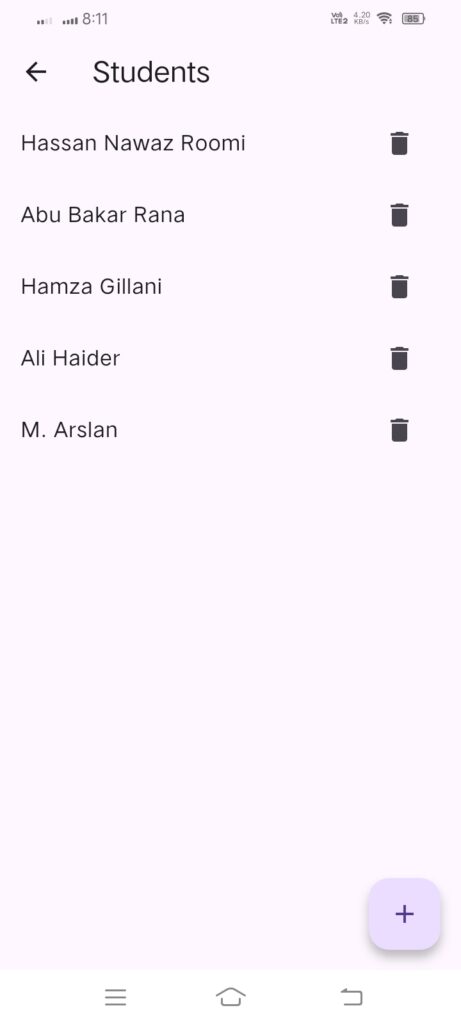
Real-World Scenario
Imagine building a University Course Management App.
The app should manage:
Departments
- Computer Science
- Software Engineering
Courses
- OOP
- Data Structures
- Flutter Development
Students
- Enrolled in multiple courses
This introduces data relationships.
For example:
A student belongs to a department and can enroll in multiple courses.
Firestore handles this efficiently.
Project Overview (Firestore Relationship Example)
We will build a Student & Class Management App, where:
-
Every class has many students (One-to-many relationship).
-
Each student belongs to one class (referenced by classId)
-
CRUD operations for both Classes and Students
Flutter Project Structure
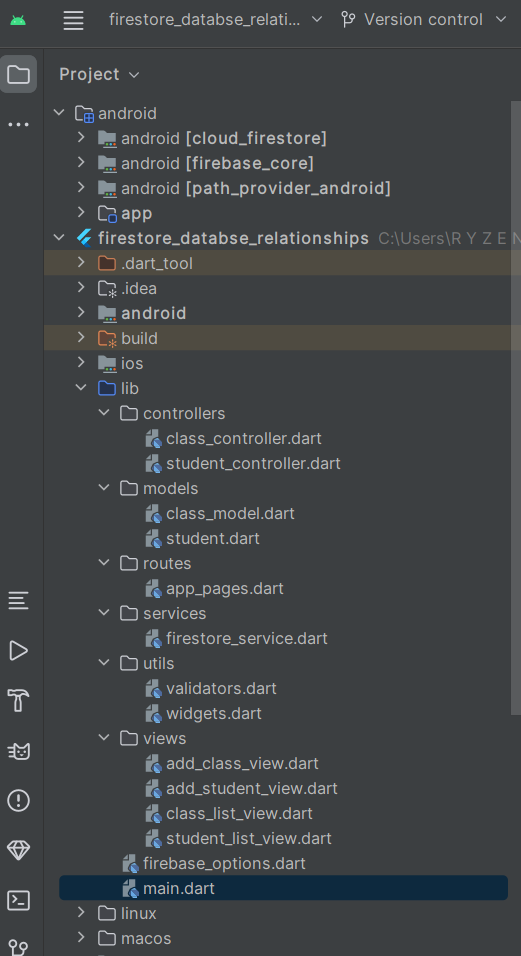
🔥 Model Layer (Data Models)
1. Class Model
class ClassModel {
  String id;
  String name;

  ClassModel({required this.id, required this.name});

  Map<String, dynamic> toMap() => {"name": name};

  factory ClassModel.fromMap(Map<String, dynamic> data, String docId) {
    return ClassModel(id: docId, name: data["name"]);
  }
}
2. Student Model
class StudentModel {
  String id;
  String name;
  String classId;

  StudentModel({
    required this.id,
    required this.name,
    required this.classId,
  });

  Map<String, dynamic> toMap() => {
    "name": name,
    "classId": classId,
  };

  factory StudentModel.fromMap(Map<String, dynamic> data, String docId) {
    return StudentModel(
      id: docId,
      name: data["name"],
      classId: data["classId"],
    );
  }
}
🔧 Firestore Service Layer
import 'package:cloud_firestore/cloud_firestore.dart';

class FirestoreService {
  final classes = FirebaseFirestore.instance.collection("classes");
  final students = FirebaseFirestore.instance.collection("students");

  // CREATE
  Future<void> addClass(String name) =>
      classes.add({"name": name});

  Future<void> addStudent(String name, String classId) =>
      students.add({"name": name, "classId": classId});

  // UPDATE
  Future<void> updateClass(String id, String name) =>
      classes.doc(id).update({"name": name});

  Future<void> updateStudent(String id, String name) =>
      students.doc(id).update({"name": name});

  // DELETE
  Future<void> deleteClass(String id) =>
      classes.doc(id).delete();

  Future<void> deleteStudent(String id) =>
      students.doc(id).delete();
}
🎮 Controller Layer (GetX Logic)
1. Class Controller
import 'package:get/get.dart';
import '../models/class_model.dart';
import '../services/firestore_service.dart';

class ClassController extends GetxController {
  final service = FirestoreService();
  var classList = <ClassModel>[].obs;

  @override
  void onInit() {
    super.onInit();
    service.classes.snapshots().listen((snapshot) {
      classList.value = snapshot.docs
          .map((doc) => ClassModel.fromMap(doc.data(), doc.id))
          .toList();
    });
  }

  Future<void> addClass(String name) => service.addClass(name);
  Future<void> deleteClass(String id) => service.deleteClass(id);
}
2. Student Controller
import 'package:get/get.dart';
import '../models/student.dart';
import '../services/firestore_service.dart';

class StudentController extends GetxController {
  final service = FirestoreService();
  var studentList = <StudentModel>[].obs;

  @override
  void onInit() {
    super.onInit();
    service.students.snapshots().listen((snapshot) {
      studentList.value = snapshot.docs
          .map((doc) => StudentModel.fromMap(doc.data(), doc.id))
          .toList();
    });
  }

  Future<void> addStudent(String name, String classId) =>
      service.addStudent(name, classId);

  Future<void> deleteStudent(String id) =>
      service.deleteStudent(id);
}
Flutter Firebase Authentication Tutorial: Step-by-Step User Login & Signup Guide
🎨 UI Layer (Simple & Clean UI)
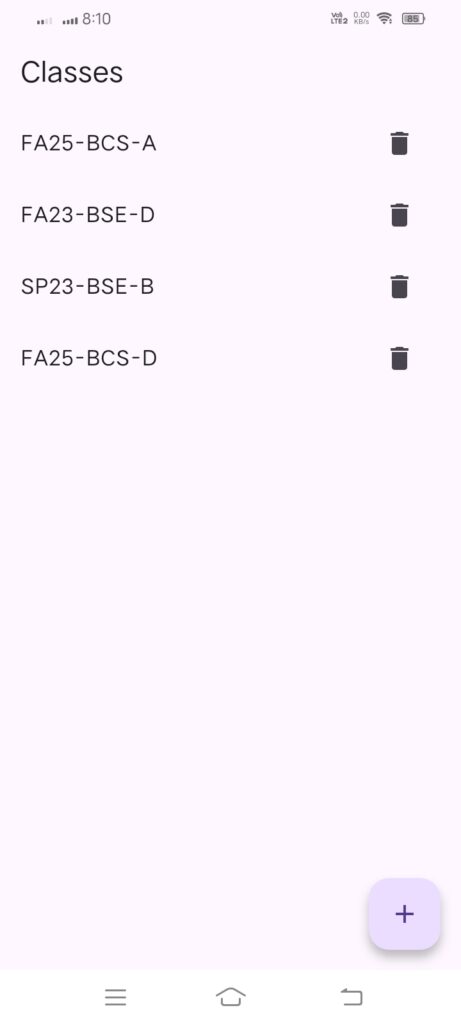
Class List View
import 'package:firestore_databse_relationships/views/student_list_view.dart';
import 'package:flutter/material.dart';
import 'package:get/get.dart';
import 'package:get/get_core/src/get_main.dart';

import '../controllers/class_controller.dart';
import 'add_class_view.dart';

class ClassListView extends StatelessWidget {
  final controller = Get.put(ClassController());

  @override
  Widget build(BuildContext context) {
    return Scaffold(
      appBar: AppBar(title: Text("Classes")),
      floatingActionButton: FloatingActionButton(
        onPressed: () => Get.to(AddClassView()),
        child: Icon(Icons.add),
      ),
      body: Obx(() {
        return ListView(
          children: controller.classList.map((data) {
            return ListTile(
              title: Text(data.name),
              trailing: IconButton(
                icon: Icon(Icons.delete),
                onPressed: () => controller.deleteClass(data.id),
              ),
              onTap: () => Get.to(StudentListView(classId: data.id)),
            );
          }).toList(),
        );
      }),
    );
  }
}
Add Class View
import 'package:flutter/material.dart';
import 'package:get/get.dart';
import 'package:get/get_core/src/get_main.dart';

import '../controllers/class_controller.dart';

class AddClassView extends StatelessWidget {
  final controller = Get.find<ClassController>();
  final nameCtrl = TextEditingController();

  @override
  Widget build(BuildContext context) {
    return Scaffold(
      appBar: AppBar(title: Text("Add Class")),
      body: Padding(
        padding: EdgeInsets.all(16),
        child: Column(
          children: [
            TextField(controller: nameCtrl, decoration: InputDecoration(labelText: "Class Name")),
            SizedBox(height: 20),
            ElevatedButton(
              onPressed: () {
                controller.addClass(nameCtrl.text.trim());
                Get.back();
              },
              child: Text("Save"),
            )
          ],
        ),
      ),
    );
  }
}
Student List View
import 'package:flutter/material.dart';
import 'package:get/get.dart';
import 'package:get/get_core/src/get_main.dart';
import '../controllers/student_controller.dart';
import 'add_student_view.dart';

class StudentListView extends StatelessWidget {
  final String classId;
  StudentListView({required this.classId});

  final controller = Get.put(StudentController());

  @override
  Widget build(BuildContext context) {
    return Scaffold(
      appBar: AppBar(title: Text("Students")),
      floatingActionButton: FloatingActionButton(
        onPressed: () => Get.to(AddStudentView(classId: classId)),
        child: Icon(Icons.add),
      ),
      body: Obx(() {
        final students = controller.studentList
            .where((s) => s.classId == classId)
            .toList();

        return ListView(
          children: students.map((data) {
            return ListTile(
              title: Text(data.name),
              trailing: IconButton(
                icon: Icon(Icons.delete),
                onPressed: () => controller.deleteStudent(data.id),
              ),
            );
          }).toList(),
        );
      }),
    );
  }
}
Final Thoughts
Building a Flutter Firestore CRUD app with GetX architecture gives you a powerful foundation for modern mobile applications.
When combined with data relationships, your app becomes capable of handling real-world complex structures.
This architecture is ideal for developers who want:
Fast development
Clean structure
Maintainable code
Real-time synchronization
If you’re serious about Flutter app development, mastering GetX + Firestore CRUD is essential.
Frequently Asked Questions
Is GetX better than Provider?
GetX is simpler and requires less boilerplate.
Can Firestore handle relationships?
Yes, through document references and arrays.
Is GetX suitable for large apps?
Yes, if structured properly.
Does Firestore update data in real time?
Yes, snapshots provide real-time updates.
🙏 Thank You for Reading!
Thank you for taking the time to read this article. I truly appreciate your interest and support. I hope this guide added value to your learning journey and helped you understand Flutter, Firestore, and modern app development more clearly.
If you enjoy practical tech tutorials, coding guides, and real-world project walkthroughs, don’t forget to subscribe to our blog. Your subscription helps us grow and encourages us to publish more high-quality tech content for developers like you.
Stay updated — more exciting tutorials, tips, and advanced Flutter topics are coming soon! 🚀💻