Stack Data Structure in C++ with Real-Life Examples | Push, Pop & Top Operations Explained
Introduction to Stack
A Stack is one of the most fundamental linear data structures in computer science. It follows a very simple but powerful rule:
“LIFO—Last In, First Out”
This means the element inserted last will be removed first.
You can think of a stack like a pile of books:
-
You place a book on top → Push
-
You remove the top book → Pop
-
You check the top book without removing it → Top (Peek)
Stacks are widely used in:
-
Function calls (Call Stack)
-
Expression evaluation
-
Undo/Redo operations
-
Parenthesis checking
-
Browser history management
Objective of This Lab
This lab session introduces:
-
How to access the top of the stack
-
How to push data onto the stack
-
How to pop data from the stack
By the end of this lab, you will understand both the concept and implementation in C++.
Real-Time Example
🔄 Example: Undo Feature in a Text Editor
When you type something in a document:
-
Each action is pushed onto a stack.
-
When you press Undo, the last action is popped from the stack.
This behavior perfectly demonstrates the LIFO principle.
Stack Implementation in C++ (Using Array)
For lab understanding, we will implement stack using an array.
Step 1: Define Stack Structure
#include <iostream>
using namespace std;

#define SIZE 5

class Stack {
    private:
    int arr[SIZE];
    int top;

    public:
    Stack() {
        top = -1;  // Stack is initially empty
    }
🔼 Push Operation
Push adds an element to the top of the stack.
Algorithm:
-
Check if stack is full
-
Increment top
-
Insert element
void push(int value) {
    if (top == SIZE - 1) {
        cout << "Stack Overflow! Cannot push " << value << endl;
        return;
    }
    top++;
    arr[top] = value;
    cout << value << " pushed into stack\n";
}
🔽 Pop Operation
Pop removes the top element from the stack.
Algorithm:
-
Check if stack is empty
-
Return top element
-
Decrement top
void pop() {
    if (top == -1) {
        cout << "Stack Underflow! Stack is empty\n";
        return;
    }
    cout << arr[top] << " popped from stack\n";
    top--;
}
👀 Accessing the Top Element (Peek)
Peek allows you to see the top element without removing it.
void peek() {
    if (top == -1) {
        cout << "Stack is empty\n";
        return;
    }
    cout << "Top element is: " << arr[top] << endl;
}
📋 Display Stack Elements
void display() {
    if (top == -1) {
        cout << "Stack is empty\n";
        return;
    }

    cout << "Stack elements:\n";
    for (int i = top; i >= 0; i--) {
        cout << arr[i] << endl;
    }
}
};
🧪 Main Function (Testing Program)
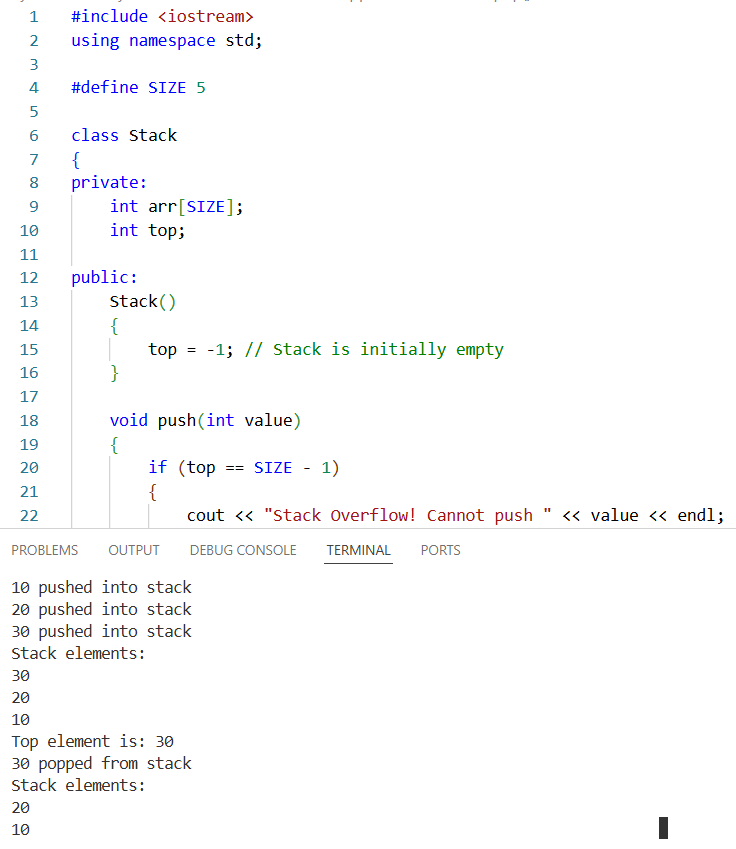
int main() {
    Stack s;

    s.push(10);
    s.push(20);
    s.push(30);

    s.display();

    s.peek();

    s.pop();
    s.display();

    return 0;
}
Important Conditions
Stack Overflow
Occurs when:
Stack Underflow
Occurs when:
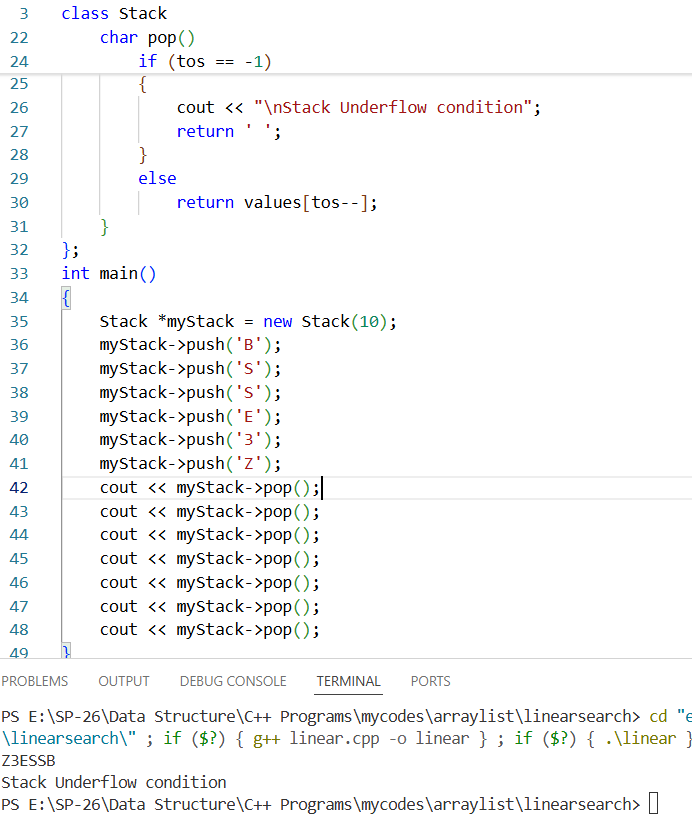
Activity 1:
#include <iostream>
using namespace std;
class Stack
{
    private:
    int tos;
    char values[];

    public:
    Stack(int x)
    {
        tos = -1;
        values[x];
    }
    void push(char x)
    {
        if (tos == 9)
            cout << "\nStack overflow condition";
        else
            values[++tos] = x;
    }
    char pop()
    {
        if (tos == -1)
        {
            cout << "\nStack Underflow condition";
            return ' ';
        }
        else
            return values[tos--];
    }
};
int main()
{
    Stack *myStack = new Stack(10);
    myStack->push('B');
    myStack->push('S');
    myStack->push('S');
    myStack->push('E');
    myStack->push('3');
    myStack->push('Z');
    cout << myStack->pop();
    cout << myStack->pop();
    cout << myStack->pop();
    cout << myStack->pop();
    cout << myStack->pop();
    cout << myStack->pop();
    cout << myStack->pop();
}
Activity 2:
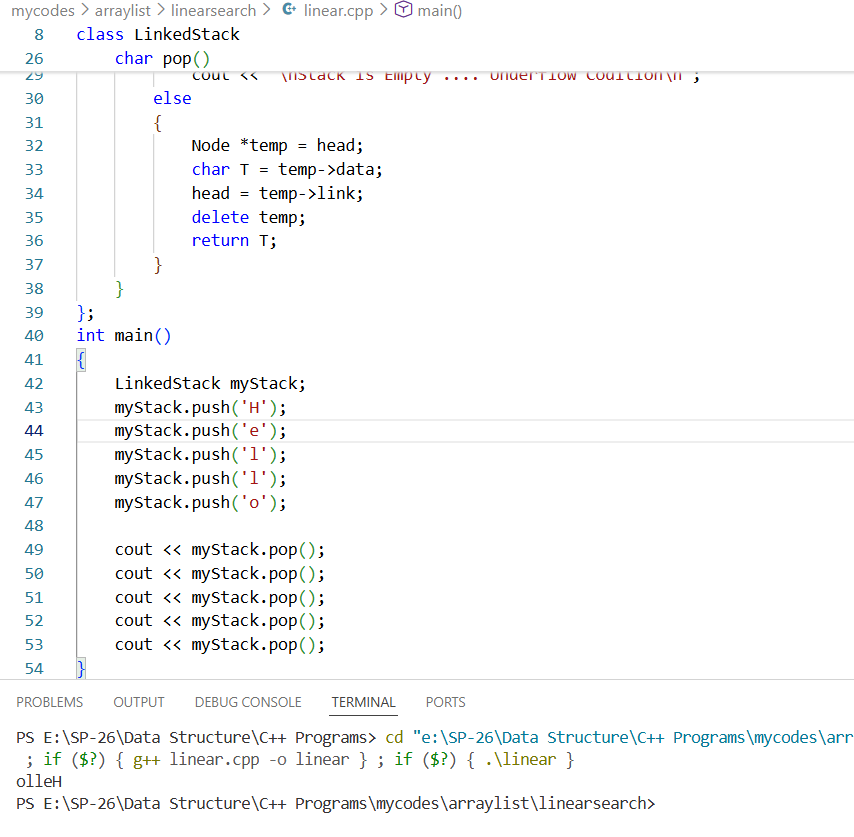
Implement Dynamic Stack.
#include <iostream>
using namespace std;
struct Node
{
char data;
Node *link;
};
class LinkedStack
{
    private:
    Node *head;

    public:
    LinkedStack()
    {
        head = NULL;
    }

    void push(char e)
    {
        Node *temp = new Node;
        temp->data = e;
        temp->link = head;
        head = temp;
    }
    char pop()
    {
        if (head == NULL)
            cout << "\nStack is Empty .... Underflow Codition\n";
        else
        {
            Node *temp = head;
            char T = temp->data;
            head = temp->link;
            delete temp;
            return T;
        }
    }
};
int main()
{
    LinkedStack myStack;
    myStack.push('H');
    myStack.push('e');
    myStack.push('l');
    myStack.push('l');
    myStack.push('o');

    cout << myStack.pop();
    cout << myStack.pop();
    cout << myStack.pop();
    cout << myStack.pop();
    cout << myStack.pop();
}
Activity 3:
Implement a Stack in Array, use class in the implementation so that Stack can be treated as an object and its operations as public interface for the user.
#include <iostream>
#include <cstring>   // For strlen()
using namespace std;

#define SIZE 100

class Stack {
    private:
    char arr[SIZE];
    int top;

    public:
    // Constructor
    Stack() {
        top = -1;
    }

    // Check if stack is full
    bool isFull() {
        return (top == SIZE - 1);
    }

    // Check if stack is empty
    bool isEmpty() {
        return (top == -1);
    }

    // Push operation
    void push(char value) {
        if (isFull()) {
            cout << "Stack Overflow!" << endl;
            return;
        }
        arr[++top] = value;
    }

    // Pop operation
    char pop() {
        if (isEmpty()) {
            cout << "Stack Underflow!" << endl;
            return '\0';
        }
        return arr[top--];
    }
};

int main() {
    Stack s1;

    char str[] = "I Love Programming";
    int len = strlen(str);

    // Push all characters into stack
    for (int i = 0; i < len; i++) {
        s1.push(str[i]);
    }

    cout << "Reversed String: ";

    // Pop all characters from stack
    for (int i = 0; i < len; i++) {
        cout << s1.pop();
    }

    return 0;
}
Activity 4:
Using the stack check that the given expression has balanced paranthesis or not.
#include <iostream>
#include <stack>
#include <string>
using namespace std;

// Function to check if expression is balanced
bool isBalanced(string expr)
{
    stack<char> s;

    for (int i = 0; i < expr.length(); i++)
    {

        char ch = expr[i];

        // If opening bracket, push to stack
        if (ch == '(' || ch == '{' || ch == '[')
        {
            s.push(ch);
        }
        // If closing bracket
        else if (ch == ')' || ch == '}' || ch == ']')
        {

            // If stack is empty, not balanced
            if (s.empty())
                return false;

            char topChar = s.top();
            s.pop();

            switch (ch)
            {
                case ')':
                    if (topChar != '(')
                        return false;
                    break;

                case '}':
                    if (topChar != '{')
                        return false;
                    break;

                case ']':
                    if (topChar != '[')
                        return false;
                    break;
            }
        }
    }

    // If stack is empty → balanced
    return s.empty();
}

int main()
{
    string expr = "[{}(){()}]";

    if (isBalanced(expr))
        cout << "Balanced";
    else
        cout << "Not Balanced";

    return 0;
}
OUTPUT: Balanced
3) Graded Lab Tasks
Lab Task 1:
Write an application using Stack that checks whether the entered string of brackets is balanced, e.g. [{( )}] is Balanced while {[( )] } is not Balanced because the priority of the pranthesis is not maintained.
Lab Task 2:
Use dynamic stack and implement Infix to Postfix conversion algorithm and test it for various inputs.
Lab Task 3:
For a given postfix expression, use dynamic stack to evaluate a numerical result for given values of variables.
📚 Applications of Stack
-
Expression evaluation (Infix to Postfix)
-
Recursion handling
-
Syntax parsing
-
Backtracking algorithms
-
Memory management
👍 Advantages of Stack
-
Simple implementation
-
Efficient push and pop (O(1))
-
Useful in many real-world problems
👎 Disadvantages
-
Fixed size (array implementation)
-
Limited access (only top element accessible)
Conclusion
The Stack Data Structure is simple yet extremely powerful. Understanding push, pop, and peek operations builds a strong foundation for advanced topics like recursion, expression evaluation, and memory management.
Mastering stack implementation in C++ is essential for:
-
Data Structures exams
-
Coding interviews
-
Practical lab assessments